
How To Persuade Your Business To Let Lightning Strike

This is the first in my series to help you complete your Lighting roll-out successfully. I am currently working on my third roll-out of Lightning and so am sharing some of my learnings to help ensure yours goes smoothly. Everything I speak about below are things that have worked for me, however, that doesn't mean it is the only way to do it. As with most things Salesforce, there are multiple ways of doing things, these are the way I found to be successful.
Discovery Phase
How do you get approval from the business that they should migrate to Salesforce Lightning?
Depending on the type of company you work for, you may need to get approval to start a project to migrate your Salesforce instance to Lightning, and this is may not be as easy as it sounds. Below are the steps I took to get approval.
Level Up
Before I took my suggestion to the business, I ensured I fully understood the implications and benefits myself. There are several ways I did this.
Lightning Readiness Report
The number one way to determine the implications of migrating to Lightning is by running the Lightning Readiness Report within your org.
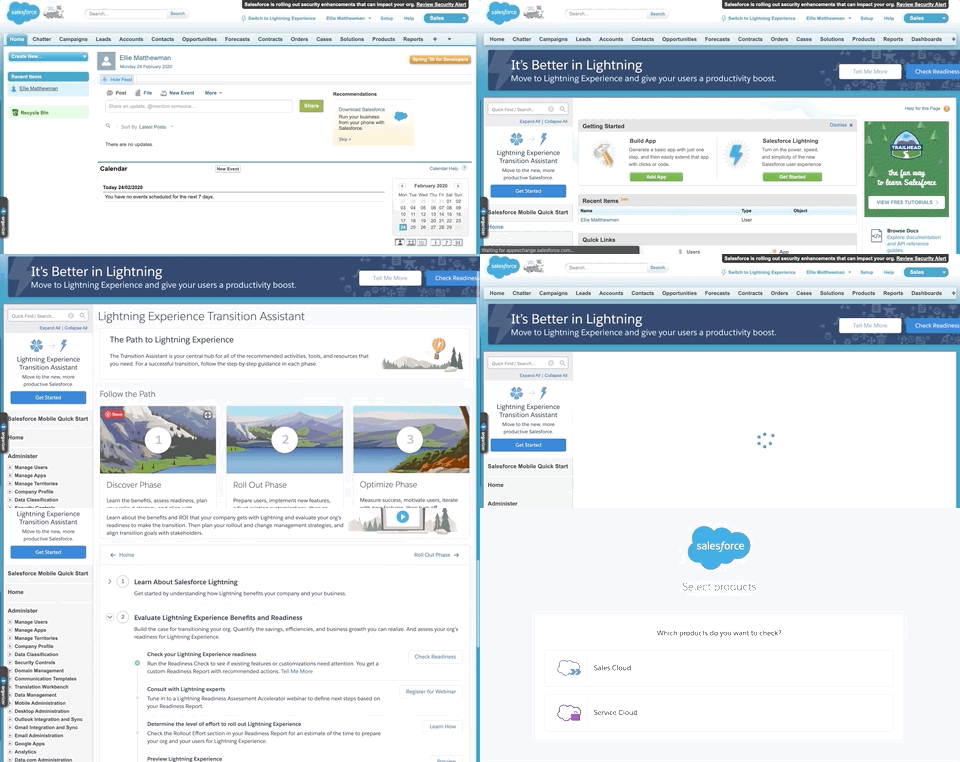
You can run this report by going to Setup, clicking Get Started on the Lighting Experience Transition Assistant, clicking Go To Steps in the Discover Phase, opening Step 2 and clicking Check Readiness. Then follow the on-screen instructions to receive your personalised Lightning Readiness Report. The Lightning Experience Transition Assistant also has a wealth of other useful resources, so be sure to check those out while you are there.
Trailhead
If you don't already have a Trailhead account, you should set one up. There is a wealth of information as well as the opportunity to get hands-on with Lightning Experience within a controlled training environment. Here is a trailmix I have put together to help you acquaint yourself to Lightning — but there is more out there than just in this Trailmix, depending on your type of business, how you are using Salesforce, and if you are an administrator or developer.
Enablement Pack
Salesforce has provided (free of charge) a Lightning Experience Enablement Pack full of resources to help you prepare for your migration, including templates for project plans, sample email campaigns, and much MUCH more. These are all provided as templates, so make sure you customise them to your own needs.
Your org, your decision
As each Salesforce implementation is very different, the benefits and risks of moving to Lightning will be very different for every company. You need to make sure you identify these personally for the Salesforce instance you are migrating.
Understand your business
If you don't already understand the ins and outs of your business and how they use Salesforce, then now is the time to do so. You need to understand what drives your business to ensure that you pull at the right levers to persuade them that Lightning is the right fit for them.
For Sales teams, you should consider understanding how and why do they make money? How can you use this to show an improved ROI (return on investment)? Can you improve the efficiency of producing required documents for the sales process, for example?
For Service teams, understand how they currently manage their cases and communicate with the people they are "servicing". Find out how they escalate cases or find out answers they don't already know the answer too. You may be able to use some of the Lightning functionality to improve their efficiency at resolving the more complex cases — as well as automating more on the simple cases.
Speak to both end-users and the decision-makers to understand existing pain points, defunct processes, and must-have functionality. Often some of these existing pain points could have been solved in Classic if you had just known about them. Use this to your advantage as quick wins in the transition to Lightning and help with end-user buy-in.
Personalise your presentation
Chances are at some point, you will have to provide a presentation about why you should move to Lightning. Don't fall into the trap of using the template presentation provided in the Enablement Pack. This deck is a great starting point, but it needs to be personalised to your business.
Ensure that you brand your presentation deck using your company's brand guidelines. You may be working on the Salesforce application, but you are doing it for your company and that is what needs to be at the heart of this transformation.
Remove slides/sections of the template that cover functionality not currently in use. For example, if you don't use Chatter, then delete all references to it, rather than confusing your audiences. Pick out the highlights that affect your business and use them as the building blocks for your presentation.
Demonstrate the benefits
Nothing gets the point across better than a real-life demonstration. Pick one of the quick-win pain points you noted earlier, and create a solution for it in Lightning in a sandbox then demonstrate the improvement from Classic to Lightning. ALWAYS ensure you have a back-up video to play if you find for some reason you cannot complete the demo.
Below is a simplified version of a video I created for one of my presentations showing how I was able to dramatically cut the time it took to create a Lead from a Case.
Don't brush the crumbs under the carpet
It is unlikely that everything regarding the rollout will be perfect, so try to make sure you consider the potential negatives and try to pre-empt some of the questions that will come from the business regarding the migration.
Here are some of the potentials questions, and my responses to them.
Will I be able to do everything I can in Classic, in Lightning?
For the most part, yes, although you may need to click in different places to do it. However, not everything available in Classic is currently available in Lightning, and some of it will never be, for example, the Mail Merge functionality. Salesforce publishes the Lightning Experience Roadmap so if the functionality you want is not yet in Lightning, you can check if/when it is expected to be.
Lightning looks like it uses client-side scripting, won't this mean it will be slower to load?
Yes, the Lightning Experience uses a lot more client-side functionality than Classic, which makes it more responsive, this can also cause poor performances if not handled correctly. The latest version of Google Chrome is the recommended browser for Lightning and Internet Explorer is only being supported until the end of 2020 — as long as you opt into extending your IE support. You can find the supported browsers here.
There a few other things you can do to improve the performance of Lightning Experience, the full list of recommended optimisations can be found here, but they include things such as including Related Lists on a secondary tab.
How much is Salesforce going to charge us for moving to Lightning?
Nothing! It is available within the current licences. You should be able to provide a better return on the investment made into Salesforce in Lightning as you will have access to more functionality, and provide even better flexibility for the end-users.
Everything is currently working fine in Classic, why should we move to Lightning if nothing is broken?
At some point, Salesforce will stop supporting Classic and then we will be forced to migrate on their timelines. By starting the work now, before our hand is being forced, we can work to our timelines and have a safety net that Classic is still available in the background if we need to revert for any reason. We could also improve inefficiencies in the current process by using some of the functionality that is only available in Lightning, as well as being able to access new functionality straight away — as Salesforce is no longer releasing new functionality for Classic.
Be realistic
As well as the pitfalls mentioned above, there are other factors you need to ensure you are realistic about.
Not everyone is going to be happy about changing user interfaces. They may have been using Salesforce day in, day out for many years or they may just be resistant to change. You need to ensure you talk about the change management part of the project. Migrating to Lighting isn't just a technical task, but also involves managing that change across all users of the platform. This is no small task, which is why I would recommend transitioning teams at a time and start with the least change-resistant to being with, they can then help become "cheerleaders" for it.
More about this in the next instalment, where I will talk about how I have run the project to migrate Lightning.