
Fantasy Football Draft Application
In 2012, my husband started a Fantasy Football League - The Golden Helmet League - of which he is the commissioner
As we needed to draft our teams, we needed a way to capture the draft as it happened. My husband searched for a suitable solution but was unable to find one that met his needs. Since I had some technical skills and had previously written VBA code for Excel, he asked me to create a draft board for our use. I built the board using Excel and it served us well for the first year and the next eight years, although it had some limitations. Overall, it was an effective solution that allowed us to quickly capture the draft as it happened.
With the additional free time I had in 2020 due to the reduced social activities due to the pandemic, I decided to utilise my skills as an experienced Salesforce developer to rebuild the draft application within Salesforce. Here is the story of my journey in doing so.
Please note that the following code is not intended for production use. It was developed quickly and has undergone some updates since its initial creation. In the interest of speed, certain shortcuts were taken and best practices may not have always been followed.
Building the data model
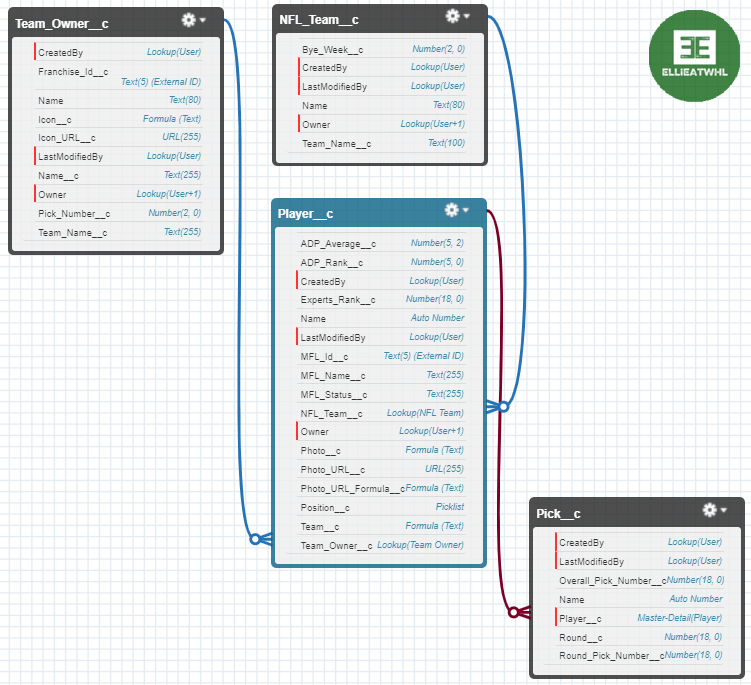
During the development process, I experimented with several different data models for the draft application. Initially, I considered using the built-in Account object to represent teams and the Contact object to represent players. However, for the final version, I decided to create custom objects for these entities to ensure that the application could be easily imported into any Salesforce organization without causing conflicts with any existing setup. In terms of managing the draft data, I ultimately chose a simple, flat structure and relied on Apex and JavaScript to handle the complex logic of organizing the picks into rounds and determining which team had each pick. This approach resulted in the creation of four custom objects to store the data.
NFL Team | NFL_Team__c
I created this object to efficiently store the team and bye week information for each player without having to repeat it for each player individually. This information can be obtained through the My Fantasy League API.
Player | Player__c
In order to ensure that all players listed in the My Fantasy League database were available for selection during the draft, I needed to create a player record for each of them. If a player did not have a corresponding record, it meant they were not listed in the My Fantasy League database and could not be drafted. As with the team and bye week information, this data was obtained through the My Fantasy League API.
Team Owner | Team_Owner__c
In order to transmit the final draft results to My Fantasy League, I needed to store information about which players were drafted by which teams, as well as the team's logo URL. This data was importable through the My Fantasy League API.
Pick | Pick__c
During the draft, these records were dynamically created when each pick was made. The record would reference the player who was drafted and the player's team, which was determined by looking up the franchise owner associated with the pick. This allowed us to track which players were drafted by which teams.
Below is the final data model I went with.
Setting up the APIs
With the data model in place, my next task was to set up the API calls to My Fantasy League to retrieve the necessary data and populate the records. While I won't go into detail about each individual API, I will mention that I used the following five exports to gather the data. (You can find more information about these exports in the My Fantasy League documentation.)
- nflByeWeeks
- players
- adp
- playerRanks
- league
Since the API callouts were essentially the same except for the URL, I created a single method to handle the callouts and passed the URL as an argument. To avoid hardcoding values such as the base URL, I stored them in Custom Settings (GHL__c).
I divided the exports into three groups and created separate classes to manage the responses and upsert the relevant records in Salesforce:
- The Bye Weeks (MFLManageByeWeeks) class served two purposes: it provided information about the bye weeks for each team, and it also allowed me to capture all of the NFL teams and upsert them as NFL_Team__c records in Salesforce.
- The Players (MFLManagePlayers) class handled the players, adp, and playerRanks callouts and was responsible for upserting the related Player__c records in Salesforce.
- The Owners (MFLManageOwners) class gathered information about the franchises and owners in the league and was responsible for upserting the corresponding Team_Owner__c records in Salesforce.
Building the draft board front end
This is the central component of the draft application. Initially, the draft was controlled from a single page that required login and was intended to be shared via screen sharing with virtual attendees. However, in a later iteration, I transformed it into a read-only view of the draft that was publicly accessible to anyone in the league, allowing them to follow the draft in real-time from any location. The page was dynamically updated whenever a pick was made using the new Commissioner page.
To begin with, I needed to determine the number of teams in the draft and the number of rounds. Obtaining the number of teams was a straightforward query to retrieve the number of Team_Owner__c records. The number of rounds is currently hard-coded, but it would be ideal to store it in the GHL__c custom settings so that it can be easily modified. With the number of teams and rounds, I was able to create the structure of the draft board.
Since this is a read-only view of the draft board that does not require user input, we need it to automatically update when the commissioner submits a pick. In a normal scenario, platform events would be the ideal solution and we could use empApi to subscribe to them. However, since we want to make this page publicly available through a community, we cannot use empApi, as it is not compatible with communities. Instead, I used cometD to subscribe to the platform event. This presented a problem because guest users viewing the page do not have a session ID to access Salesforce through the API. To work around this issue, I used a hack to temporarily use my own credentials (stored in Custom Settings) to obtain a session ID. While this is not a secure solution, it was acceptable for my purposes. In a real-life scenario, it would not be recommended.
In summary, the draft board component simply listens for an event and refreshes the data when it is received.
Building the commissioner control panel
The commissioner controller panel is the more complex part of the application, as it allows the commissioner to make, delete, and upload picks. This panel is essential for ensuring that the draft process runs smoothly and that the picks are immediately available for viewing by the rest of the league.
The draft template was constructed in a similar manner for the commissioner view, but it was displayed differently on the screen to suit the commissioner's needs. The commissioner needed three input options: make pick, delete pick, and upload to website.
Pick
The Pick button displays a modal that the commissioner can use to search for the player chosen by the current owner. This screen only shows players who are still available to prevent duplicate selections. The list of available players is filtered by including a lookup to the Team Owner for each player when they are picked. The query to return the players to display simply uses a filter to return only players whose Team Owner field is empty.
Once the pick is confirmed, we invoke an Apex class that creates the Pick record and updates the lookup field on the Player record to reference the current Team Owner. The Apex class also publishes a platform event that updates the draft board.
Undo
The Undo button removes the most recent Pick record (which has a flow triggered on delete that also clears the Team Owner field on the associated Player record, making the player available for selection again). As with the Pick button, a platform event is published to update the draft board with the removal of the pick.
Upload
The Upload button is only enabled once all the picks have been made, at which point it transmits the picks to My Fantasy League through their API.
Setting up the community pages
With all of the components in place, I created a Digital Experience (formerly known as a Community) and added the read-only view of the board to the Home page, making it publicly accessible. The Commissioner Panel was added to a separate page that required login to access. This completed the development of the draft application.
Final touches
With the remaining time before the draft, I added a few extra features to the application. One of these was a control panel within Salesforce that could be used to update the team and player listings from My Fantasy League to ensure that we had the most current information. I created buttons that called the existing Apex classes that performed the exports to accomplish this.

Source code can be found in my Github repository
Please keep in mind that this code is not intended for production use, but rather served as an interesting project to practice my architecture skills while also creating a functional tool.